
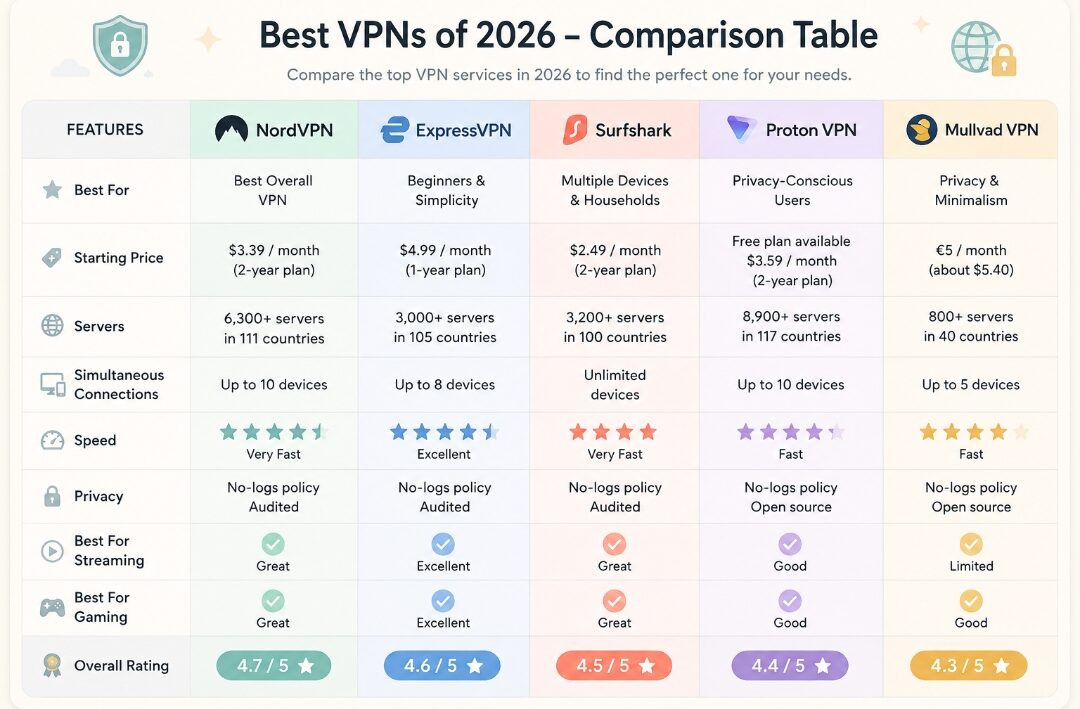
Best VPNs 2026: The Top VPN Services for Privacy, Security, Streaming, and More
Looking for the best VPN in 2026?
You’re definitely not alone.
VPNs have gone from being something mostly used by tech enthusiasts and businesses to becoming a mainstream privacy and security tool. Today, you can find hundreds of VPN apps promising faster connections, stronger encryption, better privacy, access to streaming services, and everything in between.
The problem?
Choosing the right one can be surprisingly confusing.
You might see one VPN advertising thousands of servers. Another might promise the fastest speeds. A third might focus almost entirely on privacy. Then there’s the question of free VPNs, paid VPNs, streaming, gaming, public Wi-Fi, device compatibility, and pricing.
So, where do you start?
That’s what this guide is here to help with.
We’ll look at some of the best VPNs of 2026, explain how VPNs work in plain English, discuss what they can and can’t protect you from, and give you practical tips for choosing the right VPN for your situation.
You don’t need to be a cybersecurity expert to understand this guide.
Let’s keep it simple.
Quick Look: The Best VPNs of 2026
If you just want the short version before diving into the details, here are some of the VPN services worth considering in 2026:
- NordVPN — Best overall VPN
- ExpressVPN — Best VPN for beginners and simplicity
- Surfshark — Best for multiple devices
- Proton VPN — Best for privacy-conscious users
- Mullvad VPN — Best for privacy and minimalism
There isn’t one VPN that’s perfect for absolutely everyone.
Your best choice depends on what you’re actually looking for.
If you want privacy, you may choose differently than someone who primarily wants a VPN for streaming.
If you’re a gamer, speed and latency may matter more to you.
And if you have a house full of phones, laptops, tablets, and TVs, the number of simultaneous connections could be a major factor.
Let’s break everything down.
What Is a VPN?
VPN stands for Virtual Private Network.
That sounds technical, but the basic idea is actually pretty simple.
When you normally connect to the internet, your device communicates with websites and online services through your internet connection.
Your internet service provider, commonly called an ISP, is part of that connection.
Your device also uses an IP address, which can reveal information about your network and approximate geographic location.
A VPN changes the way that connection works.
Instead of your device communicating directly with a website, your traffic first travels through a VPN server.
The basic process looks something like this:
Your device → VPN server → Website or online service
The connection between your device and the VPN server is encrypted.
The website you’re visiting generally sees the VPN server’s IP address rather than the IP address associated with your normal internet connection.
That’s one of the main reasons people use VPNs.
How Does a VPN Work?
Let’s make this even easier to understand.
Imagine you’re sending a package.
Without a VPN, you could think of the process as:
You → Delivery service → Destination
With a VPN, there’s an additional secure step:
You → Secure VPN tunnel → VPN server → Destination
Your VPN app creates an encrypted connection between your device and the VPN server.
Your internet traffic travels through that encrypted tunnel.
Once it reaches the VPN server, the server forwards your traffic to the website or service you’re trying to access.
The website sees the VPN server’s IP address.
That’s why connecting to a VPN server in another city or country can make it appear as though your internet connection is coming from that location.
However, it’s important to understand that a VPN does not make you completely anonymous.
That’s one of the biggest misconceptions about VPNs.
Does a VPN Make You Anonymous?
Not completely.
A VPN can improve your privacy by hiding your normal IP address from websites and encrypting traffic between your device and the VPN server.
But plenty of other technologies can identify or track you.
For example, if you log into your Google account, Google knows you’re logged into your account.
If you log into Instagram, Instagram knows it’s you.
Websites can also use cookies, browser fingerprinting, advertising identifiers, and other tracking technologies.
So don’t think of a VPN as an invisibility cloak.
A better way to think about it is this:
A VPN is a privacy and security tool, not a guarantee of anonymity.
That distinction is important.
Why Use a VPN in 2026?
There are several reasons why people use VPNs today.
1. Protecting Your Connection on Public Wi-Fi
Public Wi-Fi is convenient.
You can find it at airports, hotels, coffee shops, restaurants, libraries, universities, and many other places.
But you don’t always know how secure a public network is.
A VPN adds another layer of protection by encrypting the connection between your device and the VPN server.
If you travel frequently, this can be one of the most useful reasons to have a VPN installed.
2. Hiding Your IP Address
Your IP address can reveal information about your internet connection and approximate location.
When you connect through a VPN server, websites generally see the server’s IP address instead of your regular IP address.
This can help improve your online privacy.
Again, though, an IP address isn’t the only way you’re identified online.
3. Improving Privacy From Your ISP
Depending on your country and local regulations, your ISP may be able to observe certain information about your internet activity.
A VPN encrypts traffic between your device and the VPN server.
That can prevent your ISP from seeing the contents of your VPN-protected traffic, although it can generally still see that you’re connected to a VPN.
And there’s an important trade-off here.
When you use a VPN, you’re placing some trust in the VPN company.
That’s why the provider’s privacy policy matters.
4. Traveling
Traveling can mean constantly connecting to unfamiliar networks.
A VPN can give you an additional layer of protection when you’re using hotel, airport, or café Wi-Fi.
It can also allow you to connect through VPN servers in different locations.
However, don’t assume that a VPN will automatically let you access every website or service from every country.
Websites and streaming platforms can detect and block VPN connections.
Best VPNs of 2026
Now let’s get to the main event.
Here are five VPN services worth putting on your shortlist.
1. NordVPN — Best Overall VPN
NordVPN is one of the most established names in the VPN market.
Its biggest advantage is versatility.
You get a combination of security features, performance, server locations, and user-friendly applications.
For someone who doesn’t want to spend hours researching VPN technology, NordVPN is an easy provider to consider.
It supports major operating systems and devices and is designed to be relatively straightforward for everyday users.
You can use it for:
- Everyday browsing
- Public Wi-Fi
- Travel
- Streaming
- General privacy
- Multiple types of devices
Another advantage is that NordVPN offers additional security and privacy features beyond a basic VPN connection, depending on the subscription.
Who is NordVPN best for?
NordVPN is a particularly good choice if you’re looking for an all-around VPN.
It’s suitable for beginners while still offering enough features for more experienced users.
If you’re overwhelmed by all the VPN options available in 2026, NordVPN is a reasonable place to start your comparison.
2. ExpressVPN — Best for Beginners
ExpressVPN has long focused heavily on simplicity.
And that’s a bigger advantage than it might sound.
A VPN doesn’t need to be complicated.
If you open an app and have no idea what half the buttons do, you’re probably less likely to use it consistently.
ExpressVPN keeps the experience relatively straightforward.
You choose a location, connect, and let the app handle most of the technical details.
It also supports a wide variety of devices and platforms.
Who is ExpressVPN best for?
I’d recommend taking a close look at ExpressVPN if your priority is simplicity and ease of use.
It’s especially appealing to beginners who don’t want to spend their weekend learning about VPN protocols.
3. Surfshark — Best for Multiple Devices
How many internet-connected devices do you have?
Seriously, count them.
There’s probably your phone, laptop, tablet, smart TV, maybe a gaming console, and perhaps a second computer.
If you live with other people, the number gets even higher.
That’s where Surfshark becomes interesting.
It’s designed to support households and users who want to protect multiple devices without constantly disconnecting one device to connect another.
Surfshark also offers a broad range of features and relatively easy-to-use applications.
Who is Surfshark best for?
Surfshark is worth considering if you have lots of devices or want a VPN that’s convenient for a household.
It’s also a strong option for people comparing premium VPNs based on overall value.
4. Proton VPN — Best for Privacy
If privacy is your main reason for using a VPN, Proton VPN deserves your attention.
Proton is known for its broader privacy-focused ecosystem, including Proton Mail and other services.
Proton VPN offers security-focused features and also has a free plan.
That’s significant because many people want to try a VPN before paying for a subscription.
A reputable free option can be a useful starting point, although free plans generally come with limitations compared with premium subscriptions.
Who is Proton VPN best for?
Proton VPN is particularly interesting for privacy-conscious users.
It’s also worth considering if you want to test a VPN without immediately committing to a paid subscription.
5. Mullvad VPN — Best for Privacy and Minimalism
Mullvad takes a different approach from many mainstream VPN companies.
Its philosophy is strongly centered around privacy and keeping the VPN experience relatively straightforward.
Mullvad has also developed a reputation among privacy enthusiasts and technically knowledgeable users.
Instead of trying to turn the VPN into a massive collection of additional services, the company focuses heavily on the core VPN product.
Who is Mullvad best for?
If you’re primarily interested in privacy and simplicity, Mullvad is worth researching.
It may not be the most appropriate choice for someone looking for a giant entertainment bundle or a huge collection of extra features.
But for privacy-focused users, that’s part of the appeal.
What Should You Look for in a VPN?
Choosing a VPN isn’t just about picking the company with the most servers.
There are several factors worth considering.
Security
Start here.
Look for a VPN that uses modern security standards and reputable protocols.
A kill switch is another useful feature.
A VPN kill switch can block internet traffic if the VPN connection unexpectedly drops.
That can help prevent your device from continuing to communicate through your regular internet connection when your VPN disconnects.
Privacy
Read the privacy policy.
I know.
It’s probably not the most exciting thing you’ll do today.
But if you’re trusting a company with your internet traffic, you should understand what information it collects.
Look for clear explanations about:
- What information is collected
- Why it’s collected
- How long it’s stored
- Whether data is shared
- Whether independent audits have been performed
A VPN provider’s privacy claims are much more reassuring when they can be independently verified.
VPN Speed
One of the biggest concerns people have is speed.
Will a VPN slow down your internet?
It can.
That’s because your traffic is being encrypted and routed through another server.
However, the impact can vary considerably.
Your speed can depend on:
- Your original internet connection
- Your distance from the VPN server
- Server congestion
- VPN protocol
- Your device
- Your geographic location
A good VPN should minimize the performance impact.
If speed is important, test multiple servers.
You may find that one location is considerably faster than another.
VPN Server Locations
A VPN’s server network can be useful if you need access to different geographic locations.
But don’t automatically assume:
More servers = better VPN.
It doesn’t work that way.
Server quality, capacity, location, congestion, and infrastructure all matter.
A provider with fewer high-quality servers can potentially provide a better experience than a provider advertising a massive number of servers.
VPN Compatibility
Before subscribing, make sure the VPN works on your devices.
At a minimum, many users expect support for:
- Windows
- macOS
- Android
- iPhone and iPad
Depending on your needs, you may also want:
- Linux
- Smart TVs
- Routers
- Browser extensions
- Gaming devices
Don’t pay for a VPN and discover afterward that your favorite device isn’t supported.
VPNs for Streaming
Streaming is one of the biggest reasons people search for the best VPN in 2026.
A VPN can sometimes allow you to connect through a server in another country.
That can change the location associated with your connection.
But streaming isn’t as simple as it used to be.
Major streaming platforms actively detect VPNs and frequently block known VPN IP addresses.
That means a server that works today might not work tomorrow.
If streaming is your main reason for getting a VPN, check the provider’s current compatibility with the specific streaming platforms you use.
Also remember that using a VPN to access content may conflict with a platform’s terms of service or regional licensing restrictions.
Best VPN for Gaming
Gaming is another area where VPNs get a lot of attention.
A VPN can sometimes be useful for privacy, accessing certain networks, or dealing with particular connection situations.
But a VPN isn’t automatically going to lower your ping.
In fact, routing your connection through another server can increase latency.
If you’re playing a competitive online game where every millisecond matters, that’s important.
If you use a VPN for gaming, choose a server geographically close to you or close to the game’s server.
Then test your ping.
Don’t assume the VPN will improve your connection simply because it’s a VPN.
Free VPN vs. Paid VPN
This is probably one of the most important questions for beginners:
Do you really need to pay for a VPN?
Not necessarily.
Some reputable VPN companies offer free plans.
However, free VPN services can vary dramatically.
A company has to pay for servers, software development, employees, security, and infrastructure.
So if a company provides a “free” VPN, it’s worth asking how the service is funded.
Some reputable companies use free plans as a limited introduction to their premium products.
Other services may monetize users in ways that aren’t ideal for someone looking for privacy.
That’s why you shouldn’t install a random VPN simply because it costs nothing.
Research the provider first.
Are Free VPNs Safe?
Some are.
Some aren’t.
That’s the honest answer.
Don’t judge a VPN purely by whether it’s free.
Instead, look at the company behind it.
Check its reputation.
Read its privacy policy.
Look for independent audits.
See what security features it provides.
If a free VPN makes suspicious claims or asks for unnecessary permissions, that’s a major warning sign.
Remember:
Free doesn’t automatically mean bad, but free doesn’t automatically mean safe either.
Can a VPN Protect You From Hackers?
A VPN can provide additional protection by encrypting traffic between your device and the VPN server.
But you still need to protect your accounts and devices.
Use strong, unique passwords.
Enable multi-factor authentication whenever possible.
Keep your operating system updated.
Install security updates promptly.
Avoid suspicious links and attachments.
And be careful about what software you install.
A VPN is one layer of security.
It’s not your entire cybersecurity strategy.
Does a VPN Stop Malware?
No.
A VPN is not the same thing as antivirus software.
A VPN won’t magically prevent you from downloading malware.
Some VPN providers offer additional security features designed to block malicious websites, trackers, or suspicious domains.
Those can be useful.
But you should still maintain basic security practices.
Think of cybersecurity like locking your house.
A VPN might be one lock.
Your password manager is another.
Multi-factor authentication is another.
Software updates are another.
You don’t want to rely on a single layer.
How to Choose the Best VPN for You
Here’s a simple way to narrow things down.
Choose NordVPN if:
You want an all-around VPN with a broad feature set and an easy-to-use experience.
Choose ExpressVPN if:
You prioritize simplicity and want something that’s easy to understand.
Choose Surfshark if:
You have lots of devices or want a convenient VPN for a household.
Choose Proton VPN if:
Privacy is one of your biggest concerns and you want the option of trying a free plan.
Choose Mullvad if:
You care heavily about privacy and prefer a minimalist VPN experience.
These aren’t absolute rules.
They’re simply useful starting points.
Tips for Using a VPN
Once you’ve chosen your VPN, don’t just install it and forget about it.
Here are a few ways to get more out of it.
Use a Nearby Server for Better Speed
If you don’t need to connect through another country, start with a nearby server.
A closer server usually means less distance for your data to travel.
That can help with speed and latency.
Experiment With VPN Protocols
Many VPN apps allow you to choose between different protocols.
WireGuard is often a great starting point because it’s designed to be fast and efficient.
If you’re experiencing connection problems, trying another supported protocol can sometimes help.
Keep Your VPN Updated
Don’t ignore VPN updates.
Updates can fix bugs, improve performance, and address security vulnerabilities.
Turn on automatic updates if your device supports them.
Enable the Kill Switch When You Need It
If maintaining VPN protection is important, a kill switch can be useful.
It can prevent your internet connection from continuing outside the VPN tunnel if your VPN connection suddenly fails.
Test Different Servers
Don’t assume the first server you connect to is the fastest.
Try a few nearby locations.
If one feels slow, another might perform much better.
Common VPN Mistakes
Even people who have been using VPNs for years make mistakes.
Here are some of the most common ones.
Mistake #1: Choosing a VPN Based Only on Price
The cheapest VPN isn’t necessarily the best value.
Privacy, security, reliability, and performance matter too.
Mistake #2: Assuming More Servers Means Better Performance
Server count is only one factor.
Mistake #3: Thinking a VPN Makes You Completely Anonymous
It doesn’t.
Mistake #4: Forgetting to Update the VPN
Security software needs updates too.
Mistake #5: Installing a Random Free VPN
Always research the provider.
Mistake #6: Connecting to a Distant Server for No Reason
If you want speed, start with a nearby location.
Do You Need a VPN All the Time?
Not necessarily.
There’s no universal rule saying you must have your VPN connected every second of every day.
If you’re at home on a secure network and practicing good cybersecurity habits, you already have several layers of protection.
A VPN is simply another tool.
You may find it particularly useful when:
- Traveling
- Using public Wi-Fi
- Working remotely
- Connecting from unfamiliar networks
- Protecting your IP address
- Improving your privacy
The important thing is understanding what the VPN is actually doing.
Final Verdict: What’s the Best VPN in 2026?
So, after everything we’ve covered, which VPN should you choose?
The honest answer is:
It depends on you.
If you want a strong all-around option, NordVPN is worth considering.
If simplicity is your priority, ExpressVPN is a compelling choice.
If you have lots of devices, Surfshark deserves a place on your shortlist.
If privacy is your biggest concern, look closely at Proton VPN and Mullvad.
But don’t make your decision based solely on a ranking.
Think about your actual needs.
Do you care about streaming?
Do you travel frequently?
Do you use public Wi-Fi?
Do you have multiple devices?
Is privacy your biggest concern?
Do you need the fastest possible connection?
Once you answer those questions, choosing the right VPN becomes much easier.
Frequently Asked Questions About VPNs
What is the best VPN in 2026?
There isn’t one VPN that’s perfect for everyone. NordVPN, ExpressVPN, Surfshark, Proton VPN, and Mullvad are all worth considering, depending on your priorities.
Are VPNs worth it in 2026?
For many people, yes. A VPN can provide additional privacy and security, particularly when using public Wi-Fi or traveling.
Is a VPN completely anonymous?
No. A VPN can hide your IP address and encrypt traffic between your device and the VPN server, but websites can still identify you through accounts, cookies, browser fingerprinting, and other technologies.
Are free VPNs safe?
Some reputable providers offer safe free VPN plans, but free VPNs vary significantly. Research the provider before installing one.
Can a VPN increase internet speed?
Usually, you shouldn’t expect a VPN to make your connection faster. VPN encryption and routing can sometimes reduce speed, although the impact varies by provider and server.
Can I use a VPN for streaming?
A VPN can sometimes provide access to streaming content associated with another region, but streaming platforms actively block many VPN connections. Results can vary.
Can I use a VPN for gaming?
Yes, but a VPN doesn’t automatically improve gaming performance. It can sometimes increase latency, so test different servers before using one for competitive gaming.
Does a VPN protect me from viruses?
No. A VPN is not antivirus software. You should still use updated devices, security software, strong passwords, and multi-factor authentication.
Which VPN is best for privacy?
Proton VPN and Mullvad are two services worth considering if privacy is your primary concern. You should also examine each provider’s current privacy policy and independent audit history before making a decision.
The Bottom Line
The VPN market can feel overwhelming.
Every provider claims to be faster, safer, more private, or better than the competition.
But once you understand how VPNs work, choosing one becomes much easier.
A good VPN can encrypt your connection, hide your normal IP address, provide an additional layer of security on public Wi-Fi, and give you more control over your online privacy.
Just remember what it can’t do.
It can’t make you completely anonymous.
It can’t replace antivirus software.
It can’t protect you from every scam.
And it doesn’t eliminate the need for good cybersecurity habits.
The best approach is to use a VPN as one part of a bigger privacy and security strategy.
If you’re ready to choose one, start by comparing NordVPN, ExpressVPN, Surfshark, Proton VPN, and Mullvad.
Then think about what matters most to you.
Privacy?
Speed?
Streaming?
Gaming?
Travel?
Multiple devices?
Ease of use?
Once you know what you need, the “best VPN” becomes much less about marketing and much more about finding the service that actually fits your life.
And that’s ultimately what you should be looking for in 2026:
A VPN you trust, a VPN that performs well, and a VPN you’ll actually use.
And that’s a wrap!I hope this guide helped make the world of VPNs feel a little less complicated. There are plenty of options out there, but finding the right one doesn’t have to be overwhelming. Take your time, think about what matters most to you, and choose a VPN that fits the way you actually use the internet.Whether you’re looking for a little extra privacy, safer browsing while traveling, smoother streaming, or simply more control over your online experience, I hope you find the option that’s right for you.Thanks so much for spending a little time here and reading this guide. I truly appreciate it.Stay safe, stay curious, and take care of yourself online. 💜Until next time.